Monitoring view
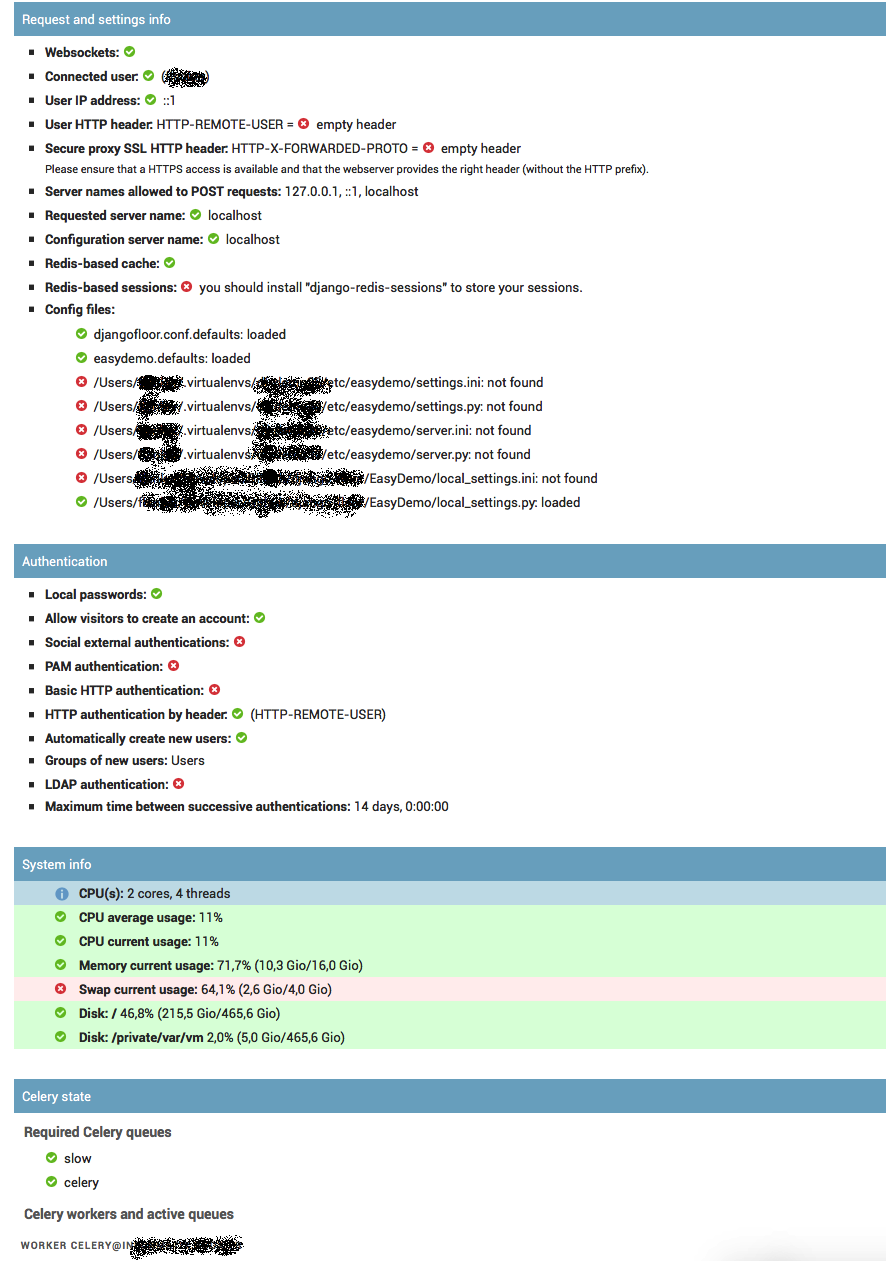
DjangoFloor provides a view to check if everything is ok or to debug if something is wrong. This view is made of several widgets:
djangofloor.views.monitoring.RequestCheck: some infos on the HTTP request (server name, whether if websockets are working, request headers, …),djangofloor.views.monitoring.System: system stats like CPU/mem/disk usage,djangofloor.views.monitoring.CeleryStats: show Celery info like the connected workers and queues,djangofloor.views.monitoring.Packages: show required and installed Python packages,djangofloor.views.monitoring.AuthenticationCheck: show active authentication methods,djangofloor.views.monitoring.LogAndExceptionCheck: raise exceptions or write some log lines,djangofloor.views.monitoring.LogLastLines: last lines of logs.
The list of widgets is defined in settings.DF_SYSTEM_CHECKS, so you can change the list of widgets. By default, this view is limited to superusers. You can easily disable this view by setting settings.DF_SYSTEM_CHECKS to an empty list. By default, this view is accessible on /df/monitoring/system_state/ or through the admin index.